Escalate a ticket when it needs a manager’s attention: an unhappy client, a board meeting in an hour, or a supplier who isn’t responding.
Escalating
Select Actions > Escalate on the ticket and say why it needs a manager.The ticket then:
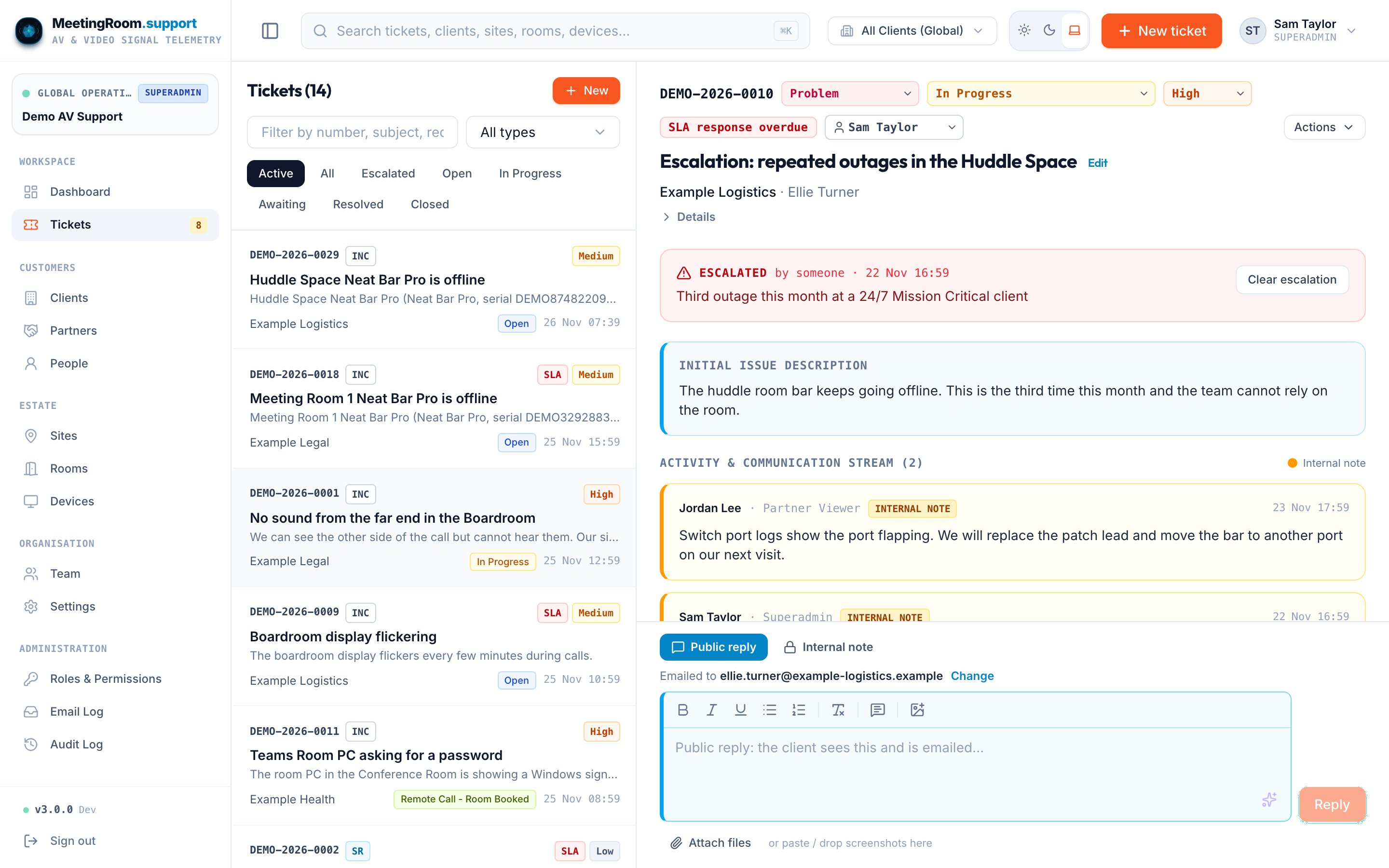
shows a red ESCALATED banner with your reason
gets a red ESC badge in the queue
appears under the Escalated tab
is emailed to everyone whose role can Receive and clear escalations (Support Managers and Superadmins, by default)
Clients who can see the ticket also see the escalation banner and its reason. Write the reason with that in mind.
Clearing an escalation
Once it’s dealt with, a manager selects Clear escalation. Only people who receive escalations can clear them.
{"docsConfig":{"theme":"mint","$schema":"https://mintlify.com/docs.json","name":"Meeting Room Support","description":"User guide for Meeting Room Support: the helpdesk for AV and video-conferencing support teams, their partners and their clients.","colors":{"primary":"#F95721","light":"#FF8A5C","dark":"#0284C7"},"logo":{"light":"https://mintcdn.com/modern-workplace-support/BU-93XXYhu99lbiI/logo/meetingroom-logo-light.png?fit=max\u0026auto=format\u0026n=BU-93XXYhu99lbiI\u0026q=85\u0026s=fd9ac3686dbd628016eda9bc264a15aa","dark":"https://mintcdn.com/modern-workplace-support/BU-93XXYhu99lbiI/logo/meetingroom-logo-dark.png?fit=max\u0026auto=format\u0026n=BU-93XXYhu99lbiI\u0026q=85\u0026s=61f4c216ca6c53b451c795c52e98568a"},"favicon":"https://mintcdn.com/modern-workplace-support/BU-93XXYhu99lbiI/favicon.svg?fit=max\u0026auto=format\u0026n=BU-93XXYhu99lbiI\u0026q=85\u0026s=e099aaffcb50df16f69ac7763883452b","navbar":{"primary":{"type":"button","label":"Try the demo","href":"https://demo.meetingroom.support"}},"footer":{"socials":{}},"styling":{"latex":false},"navigation":{"pages":[]}},"deployment":{"deploymentMetadataValue":{"subdomain":"modern-workplace-support","hasAudioNarration":false,"actualSubdomain":"modern-workplace-support","customDomains":["docs.modernworkplacesupport.com"],"gitSource":{"type":"github","owner":"jamesashton20","repo":"mav-documentaion","deployBranch":"main","contentDirectory":"","isPrivate":true,"mountPath":"","label":"","_id":"6b07e54c321087c5a78df479"},"entitlements":{"AI_CHAT":{"status":"ENABLED"},"WEB_MCP":{"status":"ENABLED"},"NARRATION":{"status":"ENABLED"}},"buildId":"6b07e9db5972eb552be85ee2","clientVersion":"0.0.4336","searchFilterCounts":[{"language":"default","tag":"Tickets","count":10},{"language":"default","tag":"Administration","count":8},{"language":"default","tag":"Clients, rooms and devices","count":7},{"language":"default","tag":"Get started","count":4},{"language":"default","tag":"Your account","count":2},{"language":"default","tag":"For clients and partners","count":2},{"language":"default","tag":"People","count":2}]},"assistantConfig":{"enableAskAiButton":false,"enableStarterQuestions":false,"enableContextualStarterQuestions":false,"enableAskAiSearchBar":true},"basePath":"","hasChatPermissions":true,"hasWebMcpPermissions":true,"toggles":[{"name":"kill-isr","enabled":true,"variant":{"name":"disabled","enabled":false,"feature_enabled":true},"impressionData":false},{"name":"custom-rbac-roles","enabled":true,"variant":{"name":"disabled","enabled":false,"feature_enabled":true},"impressionData":false},{"name":"agent-mintlify-slack","enabled":true,"variant":{"name":"disabled","enabled":false,"feature_enabled":true},"impressionData":false},{"name":"agent-integrations-settings","enabled":true,"variant":{"name":"disabled","enabled":false,"feature_enabled":true},"impressionData":false},{"name":"rbac-expansion","enabled":true,"variant":{"name":"disabled","enabled":false,"feature_enabled":true},"impressionData":false},{"name":"automations-pr-grouping","enabled":true,"variant":{"name":"disabled","enabled":false,"feature_enabled":true},"impressionData":false},{"name":"custom-prefix","enabled":true,"variant":{"name":"disabled","enabled":false,"feature_enabled":true},"impressionData":false},{"name":"analytics-v7","enabled":true,"variant":{"name":"disabled","enabled":false,"feature_enabled":true},"impressionData":false},{"name":"user-flows-analytics","enabled":true,"variant":{"name":"disabled","enabled":false,"feature_enabled":true},"impressionData":false},{"name":"no-publish-flow","enabled":true,"variant":{"name":"disabled","enabled":false,"feature_enabled":true},"impressionData":false},{"name":"snapshot-serving-live","enabled":true,"variant":{"name":"disabled","enabled":false,"feature_enabled":true},"impressionData":false},{"name":"stripTemperatureMiddleware","enabled":true,"variant":{"name":"disabled","enabled":false,"feature_enabled":true},"impressionData":false},{"name":"support-platform-pylon-zendesk","enabled":true,"variant":{"name":"disabled","enabled":false,"feature_enabled":true},"impressionData":false},{"name":"snapshot-serving","enabled":true,"variant":{"name":"disabled","enabled":false,"feature_enabled":true},"impressionData":false},{"name":"instant-rollback","enabled":true,"variant":{"name":"disabled","enabled":false,"feature_enabled":true},"impressionData":false},{"name":"granular-notifications-server","enabled":true,"variant":{"name":"disabled","enabled":false,"feature_enabled":true},"impressionData":false},{"name":"granular-notifications","enabled":true,"variant":{"name":"disabled","enabled":false,"feature_enabled":true},"impressionData":false},{"name":"automations-fable","enabled":true,"variant":{"name":"disabled","enabled":false,"feature_enabled":true},"impressionData":false},{"name":"fixed-ai-action-pricing","enabled":true,"variant":{"name":"disabled","enabled":false,"feature_enabled":true},"impressionData":false},{"name":"site-roles","enabled":true,"variant":{"name":"disabled","enabled":false,"feature_enabled":true},"impressionData":false},{"name":"automation-resolve-merge-conflict","enabled":true,"variant":{"name":"disabled","enabled":false,"feature_enabled":true},"impressionData":false},{"name":"scoped-publishing","enabled":true,"variant":{"name":"disabled","enabled":false,"feature_enabled":true},"impressionData":false},{"name":"mintql","enabled":true,"variant":{"name":"disabled","enabled":false,"feature_enabled":true},"impressionData":false},{"name":"page-level-analytics","enabled":true,"variant":{"name":"disabled","enabled":false,"feature_enabled":true},"impressionData":false},{"name":"editor-version-history-v2","enabled":true,"variant":{"name":"disabled","enabled":false,"feature_enabled":true},"impressionData":false},{"name":"billing-page-v2","enabled":true,"variant":{"name":"disabled","enabled":false,"feature_enabled":true},"impressionData":false},{"name":"full-page-search","enabled":true,"variant":{"name":"disabled","enabled":false,"feature_enabled":true},"impressionData":false},{"name":"workspace-projects","enabled":true,"variant":{"name":"disabled","enabled":false,"feature_enabled":true},"impressionData":false},{"name":"fork-pr-previews","enabled":true,"variant":{"name":"disabled","enabled":false,"feature_enabled":true},"impressionData":false},{"name":"revalidation-jwt","enabled":true,"variant":{"name":"disabled","enabled":false,"feature_enabled":true},"impressionData":false},{"name":"hobby-abuse-scan","enabled":true,"variant":{"name":"disabled","enabled":false,"feature_enabled":true},"impressionData":false},{"name":"dashboard-inbox","enabled":true,"variant":{"name":"disabled","enabled":false,"feature_enabled":true},"impressionData":false},{"name":"turbopuffer-dual-write","enabled":true,"variant":{"name":"disabled","enabled":false,"feature_enabled":true},"impressionData":false},{"name":"approve-review-flow","enabled":true,"variant":{"name":"disabled","enabled":false,"feature_enabled":true},"impressionData":false},{"name":"editor-metadata","enabled":true,"variant":{"name":"disabled","enabled":false,"feature_enabled":true},"impressionData":false},{"name":"turbopuffer-serve","enabled":true,"variant":{"name":"disabled","enabled":false,"feature_enabled":true},"impressionData":false},{"name":"live-agents","enabled":true,"variant":{"name":"disabled","enabled":false,"feature_enabled":true},"impressionData":false},{"name":"starter-pricing","enabled":true,"variant":{"name":"control","enabled":true,"payload":{"type":"string","value":"control"},"feature_enabled":true},"impressionData":false},{"name":"llms-txt-v2","enabled":true,"variant":{"name":"disabled","enabled":false,"feature_enabled":true},"impressionData":false},{"name":"wildcard-email-auth","enabled":true,"variant":{"name":"disabled","enabled":false,"feature_enabled":true},"impressionData":false}],"starterQuestions":[],"googleFontsInlined":false},"customCss":[]}
{"page":{"pagePath":"tickets/escalation","slug":"/tickets/escalation","pageMetadata":{"title":"Escalation","description":"Flag a ticket for a manager, with a reason.","href":"/tickets/escalation"},"description":{"compiledSource":"\"use strict\";\nconst {jsx: _jsx} = arguments[0];\nconst {useMDXComponents: _provideComponents} = arguments[0];\nfunction _createMdxContent(props) {\n const _components = {\n p: \"p\",\n ..._provideComponents(),\n ...props.components\n };\n return _jsx(_components.p, {\n children: \"Flag a ticket for a manager, with a reason.\"\n });\n}\nfunction MDXContent(props = {}) {\n const {wrapper: MDXLayout} = {\n ..._provideComponents(),\n ...props.components\n };\n return MDXLayout ? _jsx(MDXLayout, {\n ...props,\n children: _jsx(_createMdxContent, {\n ...props\n })\n }) : _createMdxContent(props);\n}\nreturn {\n default: MDXContent\n};\n","frontmatter":{},"scope":{}},"pageType":"default","mdx":{"mdxSource":{"compiledSource":"\"use strict\";const{Fragment:_Fragment,jsx:_jsx,jsxs:_jsxs}=arguments[0];const{useMDXComponents:_provideComponents}=arguments[0];function _createMdxContent(props){const _components={em:`em`,li:`li`,p:`p`,strong:`strong`,ul:`ul`,..._provideComponents(),...props.components},{Heading,OptimizedImage,Warning}=_components;if(!Heading)_missingMdxReference(`Heading`,true);if(!OptimizedImage)_missingMdxReference(`OptimizedImage`,true);if(!Warning)_missingMdxReference(`Warning`,true);return _jsxs(_Fragment,{children:[_jsx(_components.p,{children:`Escalate a ticket when it needs a manager’s attention: an unhappy client, a board meeting in an hour, or a supplier who isn’t responding.`}),`\n`,_jsx(Heading,{level:`2`,id:`escalating`,children:`Escalating`}),`\n`,_jsxs(_components.p,{children:[`Select `,_jsx(_components.strong,{children:`Actions > Escalate`}),` on the ticket and say why it needs a manager.`]}),`\n`,_jsx(OptimizedImage,{src:`https://mintcdn.com/modern-workplace-support/BU-93XXYhu99lbiI/images/ticket-escalate.png?fit=max\u0026auto=format\u0026n=BU-93XXYhu99lbiI\u0026q=85\u0026s=2b16b780de6a731e83714d63e77368df`,alt:`The Escalate ticket dialog asking why it needs a manager`,\"data-og-width\":`2880`,width:`2880`,\"data-og-height\":`1800`,height:`1800`,\"data-path\":`images/ticket-escalate.png`,\"data-optimize\":`true`,\"data-opv\":`3`,srcset:`https://mintcdn.com/modern-workplace-support/BU-93XXYhu99lbiI/images/ticket-escalate.png?w=280\u0026fit=max\u0026auto=format\u0026n=BU-93XXYhu99lbiI\u0026q=85\u0026s=a81a3ff4fbb97ee728206a400da7da61 280w, https://mintcdn.com/modern-workplace-support/BU-93XXYhu99lbiI/images/ticket-escalate.png?w=560\u0026fit=max\u0026auto=format\u0026n=BU-93XXYhu99lbiI\u0026q=85\u0026s=0756d94d9bb9c87c3d6e061b91b46e0d 560w, https://mintcdn.com/modern-workplace-support/BU-93XXYhu99lbiI/images/ticket-escalate.png?w=840\u0026fit=max\u0026auto=format\u0026n=BU-93XXYhu99lbiI\u0026q=85\u0026s=a871097030487d4881dc29556de29208 840w, https://mintcdn.com/modern-workplace-support/BU-93XXYhu99lbiI/images/ticket-escalate.png?w=1100\u0026fit=max\u0026auto=format\u0026n=BU-93XXYhu99lbiI\u0026q=85\u0026s=9d930874bcb421aa6b1cbad2115eef7d 1100w, https://mintcdn.com/modern-workplace-support/BU-93XXYhu99lbiI/images/ticket-escalate.png?w=1650\u0026fit=max\u0026auto=format\u0026n=BU-93XXYhu99lbiI\u0026q=85\u0026s=a88ec1d574a43b56cc0c4ebeb45e4bf8 1650w, https://mintcdn.com/modern-workplace-support/BU-93XXYhu99lbiI/images/ticket-escalate.png?w=2500\u0026fit=max\u0026auto=format\u0026n=BU-93XXYhu99lbiI\u0026q=85\u0026s=768c33227a28ff7610822da13ee21c50 2500w`}),`\n`,_jsx(_components.p,{children:`The ticket then:`}),`\n`,_jsxs(_components.ul,{children:[`\n`,_jsxs(_components.li,{children:[`shows a red `,_jsx(_components.strong,{children:`ESCALATED`}),` banner with your reason`]}),`\n`,_jsxs(_components.li,{children:[`gets a red `,_jsx(_components.strong,{children:`ESC`}),` badge in the queue`]}),`\n`,_jsxs(_components.li,{children:[`appears under the `,_jsx(_components.strong,{children:`Escalated`}),` tab`]}),`\n`,_jsxs(_components.li,{children:[`is emailed to everyone whose role can `,_jsx(_components.em,{children:`Receive and clear escalations`}),` (Support Managers and Superadmins, by default)`]}),`\n`]}),`\n`,_jsx(OptimizedImage,{src:`https://mintcdn.com/modern-workplace-support/BU-93XXYhu99lbiI/images/ticket-escalated.png?fit=max\u0026auto=format\u0026n=BU-93XXYhu99lbiI\u0026q=85\u0026s=ed79bf90066d0dfb7ddce4e80924cd3b`,alt:`An escalated ticket with the red banner and Clear escalation button`,\"data-og-width\":`2880`,width:`2880`,\"data-og-height\":`1800`,height:`1800`,\"data-path\":`images/ticket-escalated.png`,\"data-optimize\":`true`,\"data-opv\":`3`,srcset:`https://mintcdn.com/modern-workplace-support/BU-93XXYhu99lbiI/images/ticket-escalated.png?w=280\u0026fit=max\u0026auto=format\u0026n=BU-93XXYhu99lbiI\u0026q=85\u0026s=4321587ba1ae02a0fce5a977fe45b8f3 280w, https://mintcdn.com/modern-workplace-support/BU-93XXYhu99lbiI/images/ticket-escalated.png?w=560\u0026fit=max\u0026auto=format\u0026n=BU-93XXYhu99lbiI\u0026q=85\u0026s=02e9b7ed52358c5ab46a88e3eba559fe 560w, https://mintcdn.com/modern-workplace-support/BU-93XXYhu99lbiI/images/ticket-escalated.png?w=840\u0026fit=max\u0026auto=format\u0026n=BU-93XXYhu99lbiI\u0026q=85\u0026s=56364f4a6195a2cdf9187edcebf2e7e8 840w, https://mintcdn.com/modern-workplace-support/BU-93XXYhu99lbiI/images/ticket-escalated.png?w=1100\u0026fit=max\u0026auto=format\u0026n=BU-93XXYhu99lbiI\u0026q=85\u0026s=3199538b424579eab8c2074d2e331ce5 1100w, https://mintcdn.com/modern-workplace-support/BU-93XXYhu99lbiI/images/ticket-escalated.png?w=1650\u0026fit=max\u0026auto=format\u0026n=BU-93XXYhu99lbiI\u0026q=85\u0026s=5da95e95f20e524614becc0a14bfe748 1650w, https://mintcdn.com/modern-workplace-support/BU-93XXYhu99lbiI/images/ticket-escalated.png?w=2500\u0026fit=max\u0026auto=format\u0026n=BU-93XXYhu99lbiI\u0026q=85\u0026s=4cd41f524b065abcb02006cb752aa774 2500w`}),`\n`,_jsx(Warning,{children:_jsx(_components.p,{children:`Clients who can see the ticket also see the escalation banner and its reason. Write the reason with that in mind.`})}),`\n`,_jsx(Heading,{level:`2`,id:`clearing-an-escalation`,children:`Clearing an escalation`}),`\n`,_jsxs(_components.p,{children:[`Once it’s dealt with, a manager selects `,_jsx(_components.strong,{children:`Clear escalation`}),`. Only people who receive escalations can clear them.`]})]})}function MDXContent(props={}){const{wrapper:MDXLayout}={..._provideComponents(),...props.components};return MDXLayout?_jsx(MDXLayout,{...props,children:_jsx(_createMdxContent,{...props})}):_createMdxContent(props)}return{default:MDXContent};function _missingMdxReference(id,component){throw new Error(`Expected `+(component?`component`:`object`)+\" `\"+id+\"` to be defined: you likely forgot to import, pass, or provide it.\")}","frontmatter":{},"scope":{"config":{},"pageMetadata":{"title":"Escalation","description":"Flag a ticket for a manager, with a reason.","href":"/tickets/escalation"}}},"mdxSourceWithNoJs":null},"mdxExtracts":{"tableOfContents":[{"title":"Escalating","slug":"escalating","depth":2,"children":[]},{"title":"Clearing an escalation","slug":"clearing-an-escalation","depth":2,"children":[]}],"codeExamples":{}},"jsLinks":[],"subdomain":"modern-workplace-support","siteName":"Meeting Room Support","title":"Escalation - Meeting Room Support","contextualStarterQuestions":[],"navMaps":{"firstHrefInVersion":{},"firstHrefInLanguage":{}},"lastModified":"2026-11-26T07:58:28.828Z","originalFileLocation":"tickets/escalation.mdx"},"headHtml":"\u003cscript data-mint-head>(function(){var d=document.documentElement,p=null;if(!p){try{p=localStorage.getItem(\"isDarkMode\")}catch(e){}if(p==='true')p='dark';else if(p==='false')p='light';if(p!=='light'\u0026\u0026p!=='dark'\u0026\u0026p!=='system')p=\"system\"}var r=p==='system'?(matchMedia(\"(prefers-color-scheme: dark)\").matches?'dark':'light'):p;d.classList.remove(r==='dark'?'light':'dark');d.classList.add(r);d.setAttribute(\"data-theme-preference\",p)})();\u003c/script>\u003cmeta data-mint-head name=\"description\" content=\"Flag a ticket for a manager, with a reason.\">\u003cmeta data-mint-head name=\"application-name\" content=\"Meeting Room Support\">\u003cmeta data-mint-head name=\"generator\" content=\"Mintlify\">\u003clink data-mint-head rel=\"icon\" type=\"image/png\" sizes=\"192x192\" href=\"/mintlify-assets/_mintlify/favicons/modern-workplace-support/g2xrDG3VDcjeDVfH/_generated/favicon/android-chrome-192x192.png\" media=\"(prefers-color-scheme: light)\">\u003clink data-mint-head rel=\"apple-touch-icon\" type=\"image/png\" sizes=\"180x180\" href=\"/mintlify-assets/_mintlify/favicons/modern-workplace-support/g2xrDG3VDcjeDVfH/_generated/favicon/apple-touch-icon.png\">\u003clink data-mint-head rel=\"icon\" type=\"image/png\" sizes=\"16x16\" href=\"/mintlify-assets/_mintlify/favicons/modern-workplace-support/g2xrDG3VDcjeDVfH/_generated/favicon/favicon-16x16.png\" media=\"(prefers-color-scheme: light)\">\u003clink data-mint-head rel=\"icon\" type=\"image/png\" sizes=\"32x32\" href=\"/mintlify-assets/_mintlify/favicons/modern-workplace-support/g2xrDG3VDcjeDVfH/_generated/favicon/favicon-32x32.png\" media=\"(prefers-color-scheme: light)\">\u003clink data-mint-head rel=\"shortcut icon\" type=\"image/x-icon\" href=\"/mintlify-assets/_mintlify/favicons/modern-workplace-support/g2xrDG3VDcjeDVfH/_generated/favicon/favicon.ico\" media=\"(prefers-color-scheme: light)\">\u003clink data-mint-head rel=\"icon\" type=\"image/png\" sizes=\"192x192\" href=\"/mintlify-assets/_mintlify/favicons/modern-workplace-support/g2xrDG3VDcjeDVfH/_generated/favicon-dark/android-chrome-192x192.png\" media=\"(prefers-color-scheme: dark)\">\u003clink data-mint-head rel=\"icon\" type=\"image/png\" sizes=\"16x16\" href=\"/mintlify-assets/_mintlify/favicons/modern-workplace-support/g2xrDG3VDcjeDVfH/_generated/favicon-dark/favicon-16x16.png\" media=\"(prefers-color-scheme: dark)\">\u003clink data-mint-head rel=\"icon\" type=\"image/png\" sizes=\"32x32\" href=\"/mintlify-assets/_mintlify/favicons/modern-workplace-support/g2xrDG3VDcjeDVfH/_generated/favicon-dark/favicon-32x32.png\" media=\"(prefers-color-scheme: dark)\">\u003clink data-mint-head rel=\"shortcut icon\" type=\"image/x-icon\" href=\"/mintlify-assets/_mintlify/favicons/modern-workplace-support/g2xrDG3VDcjeDVfH/_generated/favicon-dark/favicon.ico\" media=\"(prefers-color-scheme: dark)\">\u003cmeta data-mint-head property=\"og:title\" content=\"Escalation - Meeting Room Support\">\u003cmeta data-mint-head property=\"og:description\" content=\"Flag a ticket for a manager, with a reason.\">\u003cmeta data-mint-head property=\"og:site_name\" content=\"Meeting Room Support\">\u003cmeta data-mint-head property=\"og:url\" content=\"https://docs.modernworkplacesupport.com/tickets/escalation\">\u003cmeta data-mint-head property=\"og:type\" content=\"website\">\u003cmeta data-mint-head property=\"og:image\" content=\"https://modern-workplace-support.mintlify.site/_mintlify/api/og/v2?division=Tickets\u0026amp;title=Escalation\u0026amp;description=Flag+a+ticket+for+a+manager%2C+with+a+reason.\u0026amp;theme=4f769d65a9e3fe3c36a4a2cf\u0026amp;signature=dd7b029393f00e0025531a4048a9a0f01dd77d14982e19d734c49682e1160cc2\">\u003cmeta data-mint-head property=\"og:image:width\" content=\"1200\">\u003cmeta data-mint-head property=\"og:image:height\" content=\"630\">\u003cmeta data-mint-head name=\"twitter:card\" content=\"summary_large_image\">\u003cmeta data-mint-head name=\"twitter:title\" content=\"Escalation - Meeting Room Support\">\u003cmeta data-mint-head name=\"twitter:description\" content=\"Flag a ticket for a manager, with a reason.\">\u003cmeta data-mint-head name=\"twitter:image\" content=\"https://modern-workplace-support.mintlify.site/_mintlify/api/og/v2?division=Tickets\u0026amp;title=Escalation\u0026amp;description=Flag+a+ticket+for+a+manager%2C+with+a+reason.\u0026amp;theme=4f769d65a9e3fe3c36a4a2cf\u0026amp;signature=dd7b029393f00e0025531a4048a9a0f01dd77d14982e19d734c49682e1160cc2\">\u003cmeta data-mint-head name=\"twitter:image:width\" content=\"1200\">\u003cmeta data-mint-head name=\"twitter:image:height\" content=\"630\">\u003cmeta data-mint-head name=\"msapplication-config\" content=\"/mintlify-assets/_mintlify/favicons/modern-workplace-support/g2xrDG3VDcjeDVfH/_generated/favicon/browserconfig.xml\">\u003cmeta data-mint-head name=\"apple-mobile-web-app-title\" content=\"Meeting Room Support\">\u003cmeta data-mint-head name=\"msapplication-TileColor\" content=\"#F95721\">\u003clink data-mint-head rel=\"canonical\" href=\"https://docs.modernworkplacesupport.com/tickets/escalation\">\u003clink data-mint-head rel=\"alternate\" type=\"application/xml\" href=\"/sitemap.xml\">\u003clink data-mint-head rel=\"alternate\" type=\"text/markdown\" href=\"/tickets/escalation.md\">\u003cscript data-mint-head type=\"application/ld+json\">{\"@context\":\"https://schema.org\",\"@graph\":[{\"@type\":\"Organization\",\"@id\":\"https://docs.modernworkplacesupport.com/#organization\",\"name\":\"Meeting Room Support\",\"url\":\"https://docs.modernworkplacesupport.com\",\"logo\":{\"@type\":\"ImageObject\",\"url\":\"https://mintcdn.com/modern-workplace-support/BU-93XXYhu99lbiI/logo/meetingroom-logo-light.png?fit=max\u0026auto=format\u0026n=BU-93XXYhu99lbiI\u0026q=85\u0026s=fd9ac3686dbd628016eda9bc264a15aa\"}},{\"@type\":\"WebSite\",\"@id\":\"https://docs.modernworkplacesupport.com#website\",\"name\":\"Meeting Room Support\",\"url\":\"https://docs.modernworkplacesupport.com\",\"publisher\":{\"@id\":\"https://docs.modernworkplacesupport.com/#organization\"}},{\"@type\":\"WebPage\",\"@id\":\"https://docs.modernworkplacesupport.com/tickets/escalation#webpage\",\"url\":\"https://docs.modernworkplacesupport.com/tickets/escalation\",\"name\":\"Escalation\",\"description\":\"Flag a ticket for a manager, with a reason.\",\"dateModified\":\"2026-11-26T07:58:28.828Z\",\"isPartOf\":{\"@id\":\"https://docs.modernworkplacesupport.com#website\"},\"breadcrumb\":{\"@id\":\"https://docs.modernworkplacesupport.com/tickets/escalation#breadcrumb\"}},{\"@type\":\"BreadcrumbList\",\"@id\":\"https://docs.modernworkplacesupport.com/tickets/escalation#breadcrumb\",\"itemListElement\":[{\"@type\":\"ListItem\",\"position\":1,\"name\":\"Tickets\",\"item\":\"https://docs.modernworkplacesupport.com/tickets/dashboard\"},{\"@type\":\"ListItem\",\"position\":2,\"name\":\"Escalation\",\"item\":\"https://docs.modernworkplacesupport.com/tickets/escalation\"}]},{\"@type\":[\"Article\",\"TechArticle\"],\"@id\":\"https://docs.modernworkplacesupport.com/tickets/escalation#article\",\"headline\":\"Escalation\",\"name\":\"Escalation\",\"description\":\"Flag a ticket for a manager, with a reason.\",\"url\":\"https://docs.modernworkplacesupport.com/tickets/escalation\",\"mainEntityOfPage\":{\"@id\":\"https://docs.modernworkplacesupport.com/tickets/escalation#webpage\"},\"dateModified\":\"2026-11-26T07:58:28.828Z\",\"publisher\":{\"@id\":\"https://docs.modernworkplacesupport.com/#organization\"},\"isPartOf\":{\"@id\":\"https://docs.modernworkplacesupport.com#website\"}}]}\u003c/script>\u003cscript data-mint-head type=\"application/ld+json\">{\"@context\":\"https://schema.org\",\"@type\":\"WebSite\",\"name\":\"Meeting Room Support\",\"publisher\":{\"@type\":\"Organization\",\"name\":\"Meeting Room Support\"},\"provider\":{\"@type\":\"Organization\",\"name\":\"Mintlify\",\"url\":\"https://mintlify.com\"}}\u003c/script>","agentPointerHref":"/tickets/escalation.md","siteName":"Meeting Room Support","nav":{"global":null,"groups":[{"group":"Get started","pages":[{"title":"Meeting Room Support","sidebarTitle":"Welcome","href":"/index"},{"title":"Quickstart","href":"/quickstart"},{"title":"How the portal is organised","href":"/concepts"},{"title":"Try the demo","href":"/demo"}]},{"group":"Your account","pages":[{"title":"Signing in","href":"/account/signing-in"},{"title":"Your settings","href":"/account/settings"}]},{"group":"Tickets","pages":[{"title":"Dashboard","href":"/tickets/dashboard"},{"title":"The ticket queue","href":"/tickets/queue"},{"title":"Raising a ticket","href":"/tickets/raising"},{"title":"Tickets by email","href":"/tickets/by-email"},{"title":"Working a ticket","href":"/tickets/working"},{"title":"Replies and internal notes","href":"/tickets/replies"},{"title":"Canned responses","href":"/tickets/canned-responses"},{"title":"SLA targets","description":"How each ticket's response and resolution targets are set, when the clock stops, and what breached means.","href":"/tickets/sla"},{"title":"Escalation","href":"/tickets/escalation"},{"title":"Merging and deleting","description":"Combine duplicate tickets, and clear out junk.","href":"/tickets/merging-and-deleting"}]},{"group":"Customers","pages":[{"title":"Clients","href":"/portfolio/clients"},{"title":"Partners","href":"/portfolio/partners"},{"title":"People","href":"/people/people"}]},{"group":"Estate","pages":[{"title":"Sites","href":"/portfolio/sites"},{"title":"Site visits","href":"/portfolio/site-visits"},{"title":"Rooms","href":"/portfolio/rooms"},{"title":"Devices","href":"/portfolio/devices"},{"title":"Live device status","href":"/portfolio/device-monitoring"}]},{"group":"Your team","pages":[{"title":"Team","href":"/people/team"},{"title":"User tags","href":"/people/tags"},{"title":"Roles and permissions","href":"/people/roles"}]},{"group":"Administration","pages":[{"title":"Organisation settings","href":"/admin/organisation"},{"title":"SLA policies","href":"/admin/slas"},{"title":"Integrations","href":"/admin/integrations"},{"title":"Email log","href":"/admin/email-log"},{"title":"Audit log","href":"/admin/audit-log"},{"title":"Wallboard","href":"/admin/wallboard"},{"title":"Import and export","href":"/admin/import-export"},{"title":"Plans and add-ons","href":"/admin/plans"}]},{"group":"For clients and partners","pages":[{"title":"Using the portal as a client","href":"/guides/clients"},{"title":"Using the portal as a partner","href":"/guides/partners"}]}]},"basePath":"","title":"Escalation - Meeting Room Support","deploymentId":"dpl_9bQLTw9nc2h9csDGYcKwWenPcQWn","buildId":"dpl_9bQLTw9nc2h9csDGYcKwWenPcQWn","dynamics":["a74be98ba7"],"chunks":["zoom-image-lightbox-CIIGaZaE.js","lightbox-handle-r17bVUz3.js"]}